
ELive-Chill&Stream
Joywave Dev TeamLifestyle
3.2114.00 Reviews
- Version
- 2.0.0
- Installs
- 5.00M
- Age Rating
- Mature 17+
Screenshots
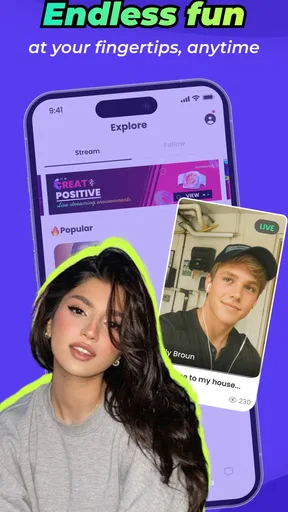
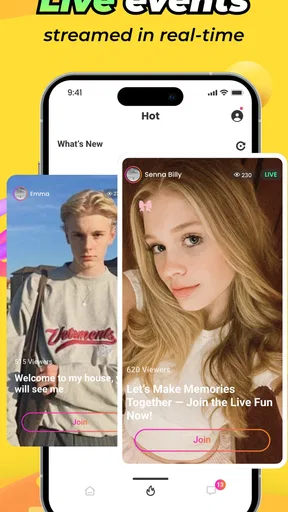

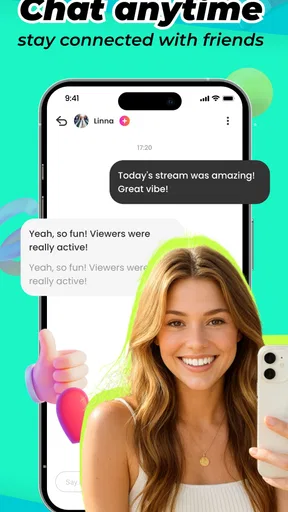
Our Review of ELive-Chill&Stream
 Analysis by Appyee
I approach ELive-Chill&Stream as a place to spend time with other people, rather than as a polished substitute for every social app I already use. That distinction matters: live video is the draw, while chat and casual interaction give a stream somewhere to go. In my experience, it suits someone who enjoys dropping into a shared online space and seeing where a conversation leads. If you prefer quiet, carefully edited content that you can watch on your own schedule, this may feel less focused.
A sensible first routine
For a new user, I’d keep the first visit simple: look around before deciding to broadcast, notice which rooms and conversations feel comfortable, and follow only the people you genuinely want to see again. That small bit of curation makes a social feed easier to return to than treating every live session as something you need to watch. It also gives you a better sense of the app’s atmosphere before you share anything yourself.
A realistic use is checking in after work, spending a short while listening to a live conversation, and joining the chat only when you have something to add. You don’t need to turn every visit into a performance. If you later want to host, starting with a familiar topic or a few friends can feel more natural than trying to entertain a large crowd immediately. I’d think of a stream as a conversation you guide, not a show that has to be perfect.
Build a comfortable setup
Before your first public broadcast, take a moment to review the audience and stream choices available to you. Decide whether you’re aiming for an open conversation or a smaller hangout, and check the relevant controls rather than assuming every stream works the same way. That habit is especially useful if you’re using the app in a shared room or around people who haven’t agreed to be on camera.
Notifications are another worthwhile early check. I’d keep alerts focused on the people or activity I actually plan to follow; otherwise, live social apps can compete for attention at awkward times. Likewise, profile customization is most useful when it helps other users understand what you’re interested in, not when it becomes another task to perfect. A few intentional choices can make the app feel more personal without requiring constant upkeep.
Make conversations easier to join
ELive’s mix of streaming and chat can be more welcoming when you enter with a modest goal: listen first, respond to one point, then decide whether to stay. That is a practical way to avoid the slightly awkward feeling of arriving in the middle of a busy room. If a conversation is not for you, moving on is part of using a live platform well; there is no need to force a connection just because a room is active.
For someone who wants to create, a repeatable plan helps more than elaborate preparation. Pick a topic you can talk about comfortably, decide who you want to reach, and have one or two prompts ready in case the chat goes quiet. This is not a special tool or hidden function, just a useful hosting habit. It can make a casual session feel more engaging while keeping the pressure low.
Where it fits among social apps
Compared with a conventional messaging app, ELive is better suited to shared, live moments than to practical one-to-one coordination. Compared with a video platform built around finished clips, it puts more weight on being present and reacting together. That makes it appealing if the interaction is the point, but less convenient when you want a searchable library of edited material or a conversation that can wait until everyone is free.
The social side also asks for more judgment than passive browsing. A live room can change quickly as people join and leave, so I’d be selective about where I spend time and what I choose to share. Anyone who wants a tightly controlled, low-interaction viewing experience may be happier with a standard streaming service. ELive makes more sense when you’re comfortable with the unpredictability that comes with real-time participation.
Costs, expectations, and boundaries
The app is free to install, but it includes optional in-app purchases, with individual items ranging from $0.99 to $99.99. I’d treat paid items as extras rather than as a necessary part of getting started. In particular, virtual gifts can make social interaction feel more expressive, but they can also make spending easy to do impulsively. Set your own limit before buying anything, and don’t assume that paying is required to enjoy a conversation.
ELive is rated Teen, so it is not an app I’d treat as automatically suitable for younger children. Live interaction depends partly on the choices users make, and families should decide whether that kind of social environment is appropriate for the person using it. If you’re trying it yourself, be thoughtful about personal details and about who else may appear in a broadcast. A little care before going live is easier than regretting an overshare afterward.
There’s also a practical distinction between a social app and a dependable way to reach someone. If you need to arrange a specific time or share something important, use a channel where the other person is likely to see it; a live room is better for spontaneous company than guaranteed follow-up. That expectation helps keep ELive in its strongest lane: casual interaction, rather than an all-purpose communication tool.
Diving into ELive-Chill&Stream
First things first, downloading and setting up ELive-Chill&Stream is a breeze. Available on both Android and iOS, the app is just a quick search away on your respective app store. Once installed, you'll find yourself in a vibrant digital space where live streaming meets social networking.
Exploring Features
One of the standout features of this app is its live streaming capability. Whether you're a seasoned streamer or just dipping your toes in, ELive-Chill&Stream offers a user-friendly interface that makes broadcasting your life or creative endeavors a seamless experience. The real magic happens with its community. You can join or create groups based on your interests, from gaming to cooking to art, and connect with people who share your passions.
The app also boasts an impressive chat feature. The chat rooms are lively, and you can engage with streamers and other viewers in real time. It’s like being at a virtual party where everyone’s invited. And let’s not forget about the integrated gaming options. You can play mini-games with friends or other users, adding a layer of fun to your interactions.
User Experience
Navigating the app is pretty intuitive. The design is sleek and modern without being over-the-top. I found the menus easy to navigate, and the icons are self-explanatory. One thing that really stood out was the customization options. You can personalize your profile and stream settings to suit your style. It's these little touches that make the app feel like your own personal space.
Now, let's talk notifications. The app does a decent job of keeping you informed without bombarding you with alerts. You can customize your notification settings to ensure you only get the updates that matter to you, which is a huge plus in my book.
Connecting with Others
At its core, ELive-Chill&Stream is all about connection. The app encourages interaction, allowing you to follow your favorite streamers, comment on streams, and even send virtual gifts. These features are not only fun but also foster a sense of community among users. It's like having a global hub for all your streaming needs.
Moreover, hosting your own streams is a great way to showcase your talents or simply hang out with friends in a digital space. The app supports both private and public streams, so you can choose your audience. Whether you're hosting a small gathering or a large-scale event, the platform is equipped to handle it all.
What the numbers mean in practice
ELive is a free lifestyle app from Efun Team, with more than one million installs and a 3.0 average from around 4,700 ratings. Those figures suggest a sizable audience, but they don’t guarantee that every room will be lively or that the experience will suit everyone. I’d use the rating as a reason to approach it with measured expectations, not as a verdict on whether you’ll enjoy it. The app is at version 1.8.0 and supports Android 6.0 and later.
That audience scale is useful in one specific way: there may be people to meet beyond your existing circle. It also means your experience depends on who is active when you open the app and which communities you choose to visit. I wouldn’t install it expecting every session to feel like a close-knit group of friends. It is better approached as a place to discover conversations, with the option to build familiar connections over time.
Who will get the most from it
I can see this working best for people who enjoy casual social discovery and don’t mind participating in real time. A hobbyist who likes talking through a creative project, someone who enjoys listening to different viewpoints, or a group of friends looking for a more lively hangout than a text thread may find a good use for it. The appeal is not simply having video available; it is being able to respond while something is happening.
On the other hand, I’d skip it if your main goal is private, dependable messaging, a quiet feed of carefully edited videos, or a social space with minimal interaction. Those needs are served more directly by messaging tools or on-demand video services. ELive asks you to make choices about what to watch, when to join, and whether to speak. If that small amount of social effort sounds tiring rather than fun, the app may not become part of your routine.
Small habits that improve the experience
One useful habit is to separate browsing from hosting. On one visit, explore and follow a few accounts that genuinely hold your interest; on another, try a short stream with a clear subject. Keeping those goals distinct makes it easier to judge what you like about the app without feeling that you need to become a creator simply because broadcasting is available.
Another is to make your notification choices match your routine. If you only have time for live conversations in the evening, alerts at other times may be more interruption than help. Check those preferences after you have followed people, since your needs can change once your feed becomes more personal. This is a low-effort adjustment, but it can be the difference between checking in deliberately and feeling pulled back into the app.
When hosting with friends, agree on the general audience and the topic before starting. A quick conversation beforehand can prevent someone from being surprised by a public setting or by a subject they would rather not discuss on camera. For a more open session, keep personal information out of the conversation and be ready to change direction if the chat becomes uncomfortable. Those simple boundaries matter more in a live setting because there is less time to review what you are about to share.
Limits worth keeping in mind
Real-time social apps are naturally less predictable than a catalog of recorded content. A room might be engaging one day and quiet the next, and a topic that works with friends may not draw much response from strangers. That variability is not unique to ELive, but it affects how I’d judge it: I would give the app a few visits at different times before deciding whether its community fits me, rather than expecting one session to settle the question.
There is also a learning curve in the social sense, even if the menus are easy to understand. Knowing where to tap is not the same as knowing when to join a conversation, how much to share, or whether a gift is worth buying. I’d treat those as personal decisions, not as tasks the app should push me into. If a room feels uncomfortable, leaving is a perfectly reasonable choice.
As for whether it is worthwhile without spending, I’d start free and see whether the conversations and streams themselves keep me interested. Paid gifts are optional extras, not a sound reason to join a room or maintain a connection. And if you’re wondering whether you need to stream to enjoy it, you don’t: watching and chatting are meaningful ways to participate. Hosting is for people who actually want to share something live, not a requirement for getting value from the app.
Final Thoughts
In conclusion, ELive-Chill&Stream offers a dynamic platform that caters to both casual users and hardcore streamers. The combination of live streaming, social networking, and gaming makes it a versatile app for anyone looking to connect and entertain. While there are a few minor tweaks that could enhance the experience, such as more detailed tutorial guides for new users, the app delivers on its promises.
If you’re eager to explore new horizons and meet like-minded people, give ELive-Chill&Stream a try. It’s a vibrant community waiting to welcome you, and who knows? You might just find your new favorite app.
My strongest recommendation is to approach it with a simple plan: browse before broadcasting, tune your alerts to your real schedule, and keep spending and privacy decisions deliberate. That gives you room to enjoy what ELive does well—live company and spontaneous interaction—without expecting it to replace every other social tool. For the right person, it can be an enjoyable place to drop in; for someone who wants predictable, edited entertainment, a more conventional video app is still the better fit.
Verdict
Strengths of ELive-Chill&Stream
- User-friendly interface for easy navigation.
- High-quality streaming with minimal lag.
- Wide range of interactive features.
- Supports both private and public streams.
- Strong community engagement features.
Limitations of ELive-Chill&Stream
- Occasional ads can disrupt the experience.
- Limited customization for stream layouts.
- Requires stable internet for best performance.
- Some features locked behind paywall.
- Minor bugs reported in the chat system.
Similar Picks in This Category
View All
SmartThings
Samsung Electronics Co., Ltd.4.6

Google Home
Google LLC4.0

Pinterest4.2

Astrotalk - Talk to Astrologer
Astrology & Horoscope4.7

My Verizon
Verizon Consumer Group4.5

Samsung Wallet (Samsung Pay)
Samsung Electronics Co., Ltd.4.1
Frequently Asked Questions
What is ELive-Chill&Stream and what can I do with it?
ELive-Chill&Stream is a versatile streaming platform designed for users who want to broadcast live content or interact with other streamers. You can host your own shows, join live streams, or engage with a community through chats and comments. It's a great way to showcase talents, share experiences, and connect with like-minded individuals.
Is ELive-Chill&Stream free to use?
Yes, ELive-Chill&Stream is free to download and use. However, it may offer in-app purchases or subscriptions for premium features, such as enhanced streaming capabilities, exclusive content, or virtual gifts. Be sure to review any costs associated with these additional services before making a purchase.
What are the system requirements for ELive-Chill&Stream?
ELive-Chill&Stream requires a stable internet connection and is compatible with most modern Android and iOS devices. Ensure your device is running the latest operating system version for optimal performance. Check the app store for specific compatibility information related to your device model before downloading.
How secure is my data on ELive-Chill&Stream?
ELive-Chill&Stream takes user privacy seriously, employing encryption and other security measures to protect your data. However, it's important to use strong passwords and be mindful of the information you share publicly. Review the app’s privacy policy to understand how your data is collected, used, and stored.
Can I earn money by streaming on ELive-Chill&Stream?
Yes, ELive-Chill&Stream offers monetization options for streamers, such as receiving virtual gifts from viewers, which can be converted into real currency. Additionally, building a large audience may attract sponsorships or advertising opportunities. Be sure to familiarize yourself with the platform's guidelines and requirements for monetization.
